
Send an emergency alert
Use the Emergency and Critical alert priorities to reach every resident fast when safety is at stake.
Emergency or Critical alert?
Both priorities go to every resident, with a push notification and an email. You don't choose a topic for them: "Emergencies and critical alerts go to every resident, so they don't need a topic."
- Emergency — highest priority. For urgent situations that need residents' immediate attention, such as a boil-water notice or a road closed by a storm. Residents get it unless they've turned off emergency notifications for that channel (push or email).
- Critical alert — overrides Do Not Disturb and Silent Mode on residents' phones. Use it only for life-threatening or urgent public-safety issues. It goes to every resident, whatever their notification settings, and it can't be limited to an area.
Who can send them: staff who can publish posts can send Emergency posts. Only city admins can send a Critical alert.
Send an Emergency post
- In the sidebar, click Feed, then click the + button (New post).
- Type a title and your message. Say what is happening, where, and what residents should do.
- Under Priority, click Emergency. The Topic picker turns off, because emergencies go to every resident.
- Click Post.
- Peny asks you to confirm (Post as an Emergency). Click Post.
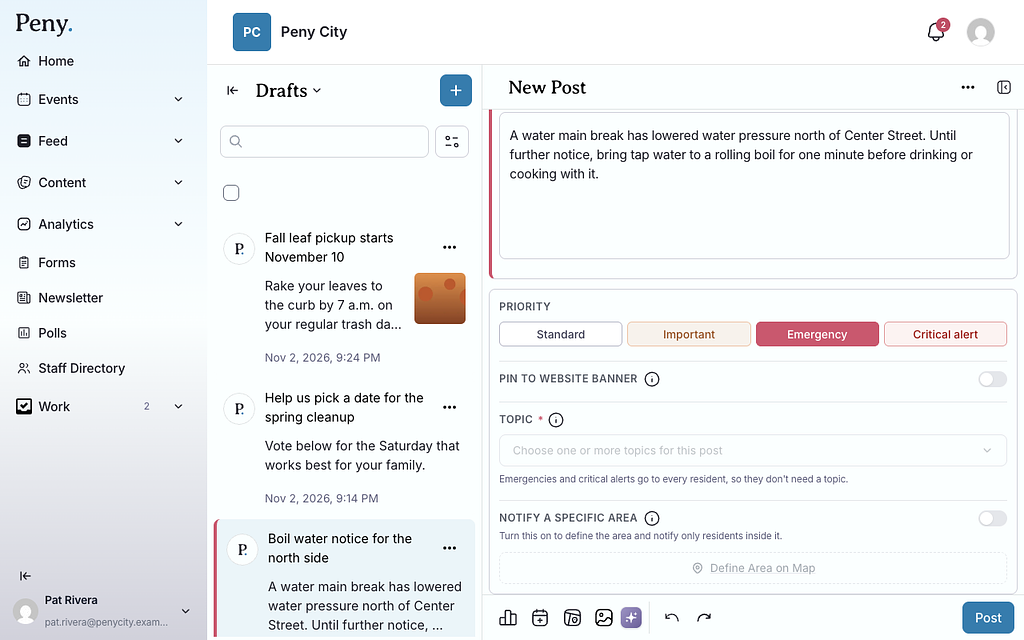
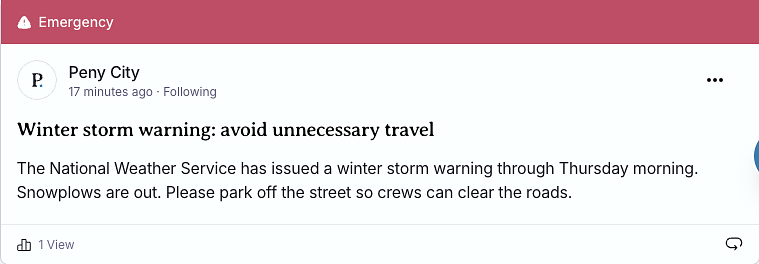
Your post goes live, residents get a push notification and an email, and the post shows a red Emergency banner in the feed.
Send a Critical alert
Only city admins can do this.
- In the sidebar, click Feed, then click the + button (New post).
- Type a title and your message.
- Under Priority, click Critical alert. Notify a Specific Area turns off: "Critical alerts are sent to all residents regardless of area."
- Click Post.
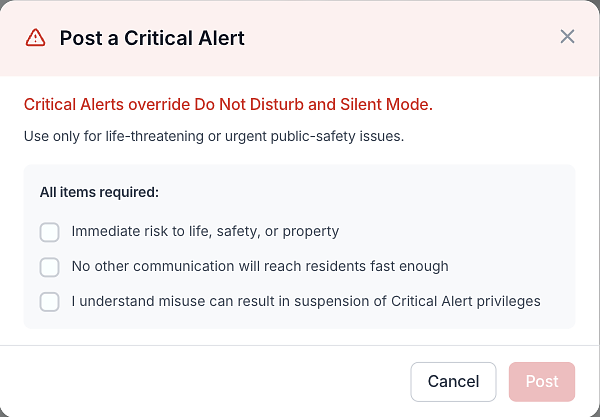
- The Post a Critical Alert window opens. Read it, then tick all three statements:
- Immediate risk to life, safety, or property
- No other communication will reach residents fast enough
- I understand misuse can result in suspension of Critical Alert privileges
- Click Post. It stays greyed out until all three statements are ticked.
Peny shows "Your post is live. Critical Alert sent to residents."
What residents receive
- A push notification on the Peny app. A Critical alert plays its sound even when the phone is on Do Not Disturb or Silent Mode.
- An email, sent right away.
- The post in your city's feed, marked with a colored banner.
Update or correct an alert
- In the Feed, click More options (the three dots) on the post and choose Edit.
- Make your changes and click Save.
- Peny saves your changes, then asks whether to notify residents about the update. Click Send Notification to send a new push notification, or Do Not Notify to skip it. Your changes are saved either way.

A new push notification doesn't send the email again. Residents get the email once, when you first publish.
Alerts from official sources
If your city has official alerts turned on, Peny can post alerts from official sources, such as the National Weather Service, to your feed automatically. On these posts, the affected area comes from the alert source and shows as Warning Area in the composer. It can't be changed there. See City account settings.
Don't see this? It may not be turned on for your city yet — email support@penyapp.com.